Open and login to Salto ProAccess Space
Navigate to System -> Third party readers

And click "ADD" (see yellow arrow)

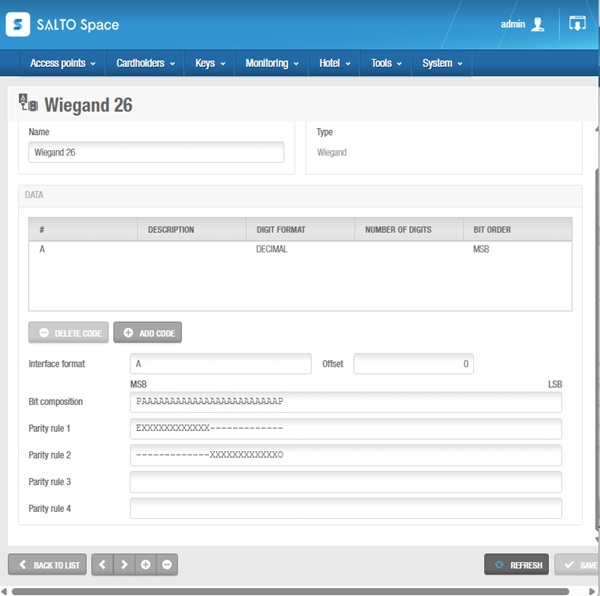
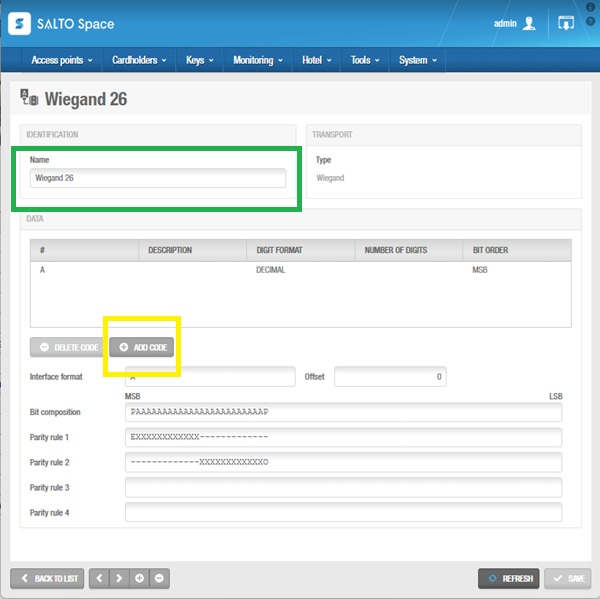
Fill in the name of the third party reader (green bounding box).
In our example it is Wiegand 26.
Click "ADD CODE" (yellow bounding box)
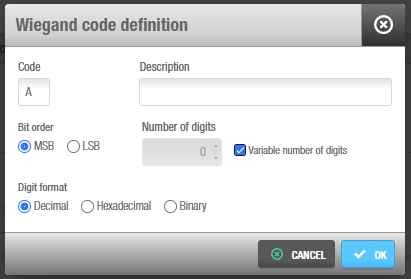
The "Wiegand code definition" form will pop up.
Fill in the "Wiegand code definition" form like below
Code: A
Bit order: MSB
Nr of digits: Variable number of digits
Digit format: Decimal
Click OK
Back in the Third party reader form, fill in the parity information. As this reader uses 26 bits - 12 even and 12 odd - it is configured as follows:
Interface: A
Bit composition: PAAAAAAAAAAAAAAAAAAAAAAAAP (2 parity bits + 24 bits = 26 bits)
Parity rule 1: EXXXXXXXXXXXX------------- (1 even parity bit + bits 2-13 are even)
Parity rule 2: -------------XXXXXXXXXXXXO ( bits 14-15 are odd, 1 odd parity bit)
Click save
Go to step 2